Webhook Authenticity
Every webhook request sent by Xbase includes two custom headers that allow you to verify the request is genuine and has not been tampered with.
| Header | Description |
|---|---|
X-Webhook-Timestamp | Unix timestamp (in seconds) of when the request was sent. |
X-Webhook-Signature | Base64-encoded ECDSA signature of the request payload. |
Verifying the Signature
To verify a webhook, reconstruct the signing string by concatenating the timestamp and the raw request body, then verify the signature against your public key.
The example below is written in TypeScript, but the same logic can be applied in any language that supports ECDSA signature verification.
import crypto from 'crypto';

async function verifyWebhook(
  timestamp: string,
  signature: string,
  rawBody: string
): Promise<boolean> {
  // Reject requests older than 30 seconds to prevent replay attacks
  const age = Math.floor(Date.now() / 1000) - Number(timestamp);
  if (age > 30) {
    return false;
  }

  const publicKeyBase64 = 'YOUR_PUBLIC_KEY';
  const signingString = `${timestamp}.${rawBody}`;

  const publicKeyObject = crypto.createPublicKey({
    key: Buffer.from(publicKeyBase64, 'base64'),
    format: 'der',
    type: 'spki',
  });

  return crypto.verify(
    'sha256',
    Buffer.from(signingString),
    publicKeyObject,
    Buffer.from(signature, 'base64')
  );
}
The signing string is formed by joining the
X-Webhook-Timestampvalue and the raw JSON body with a.separator:{timestamp}.{rawBody}.
Getting Your Public Key
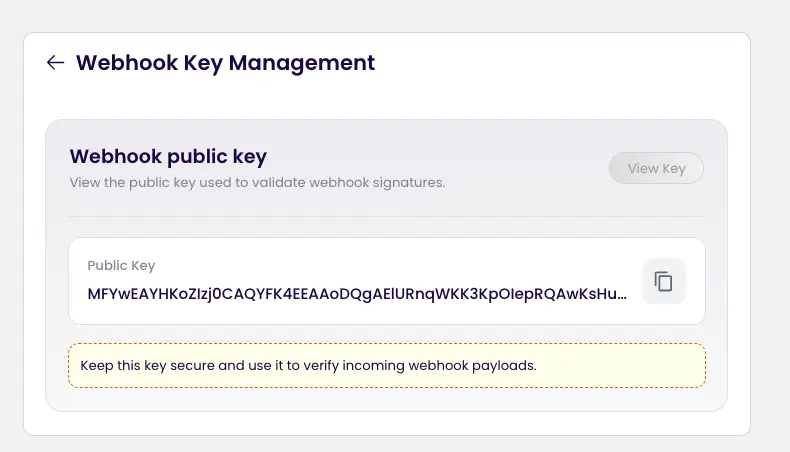
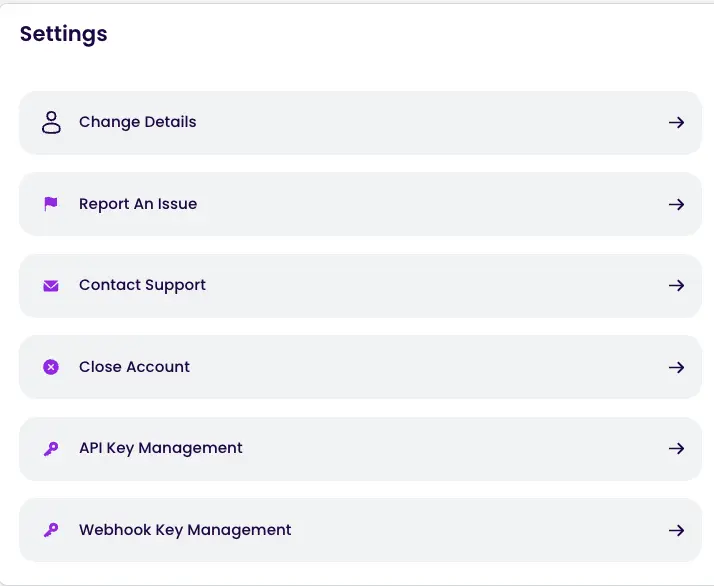
Step 1: Navigate to Settings and Open Webhook Key Management
In your dashboard, go to Settings and select Webhook Key Management.
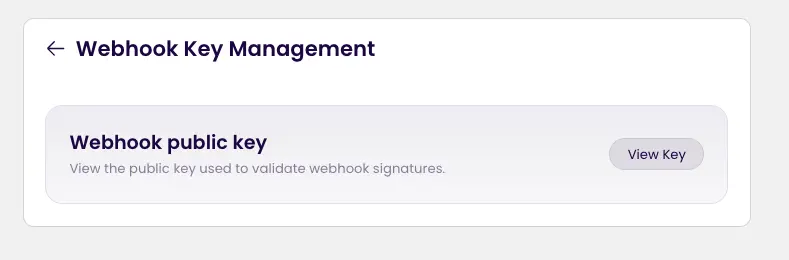
Step 2: Click on View Key
Click the View Key button to reveal your public key.
Step 3: Copy the Key
Copy the public key.